
Make music videos that hit on the beat. On Windows.
Beat-synced cuts, word-level lyric videos, audio visualizers, and lo-fi atmosphere. All locked to your song, all on your PC. Free to try, $49 to unlock.
MadSync helps creators edit video to music with local stem separation, beat detection, word-level lyrics, readable text styling, Beat Drops, Audio Visualizers, image and lo-fi atmosphere overlays, effects, transitions, and fast MP4/WebM/GIF export without uploading media to the cloud.
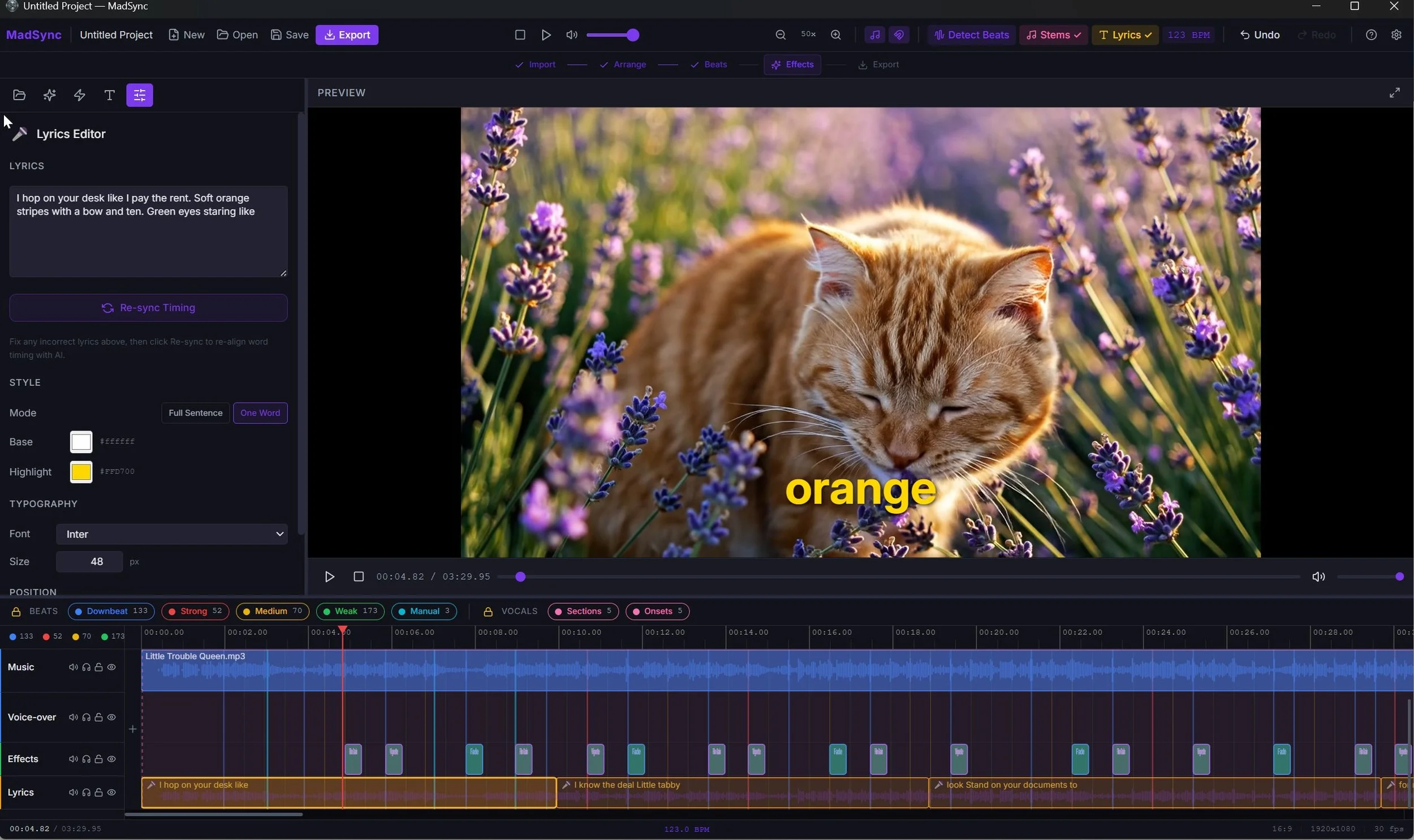
Sync every word to the beat
The free demo is the full app. Exports get a small "Made with MadSync" watermark and stop at 60 seconds. The $49 license removes both. Windows 10/11, works offline after a one-time activation.
On first launch Windows may show 'More info → Run anyway,' normal for new indie apps. Nothing you import is uploaded. Installer is about 1.6 GB
$49
Once, unlocks all
Private
Zero telemetry
Free
Full app, no card
Local
No uploads
Edit video to music without timeline guesswork
MadSync is built around the music. It brings beat detection, stem separation, lyric timing, overlays, effects, and local export together in one Windows app, so your edit follows the song.
Find the beat faster
One click reads the beat from the drum stem and drops markers on the timeline: downbeats, strong, medium, and weak beats, plus drum hits.
Snap your cuts to them, then build Beat FX, transitions, Beat Drops, and beat-synced visuals on the same grid so everything moves with the music.
Sync lyrics by word
Create karaoke-style captions, adjust word timing, and style text on the timeline. Show lyrics as a single line, a short stack of recent lines, or a full paragraph block, and lyric motion effects (fade, scale pop, pulse, glow, color cycle, and more) play in all three, matching between preview and export.
Export without uploading
Your media never leaves your computer, and the AI runs locally too.
Stem separation, lyric transcription, and beat detection all happen on your machine.
Edit, process, and export finished video for YouTube, Shorts, Reels, promos, and client work.
Built for lyric videos, AMVs, Shorts, Reels, and artist promos
MadSync finds the beats. You shape the edit.
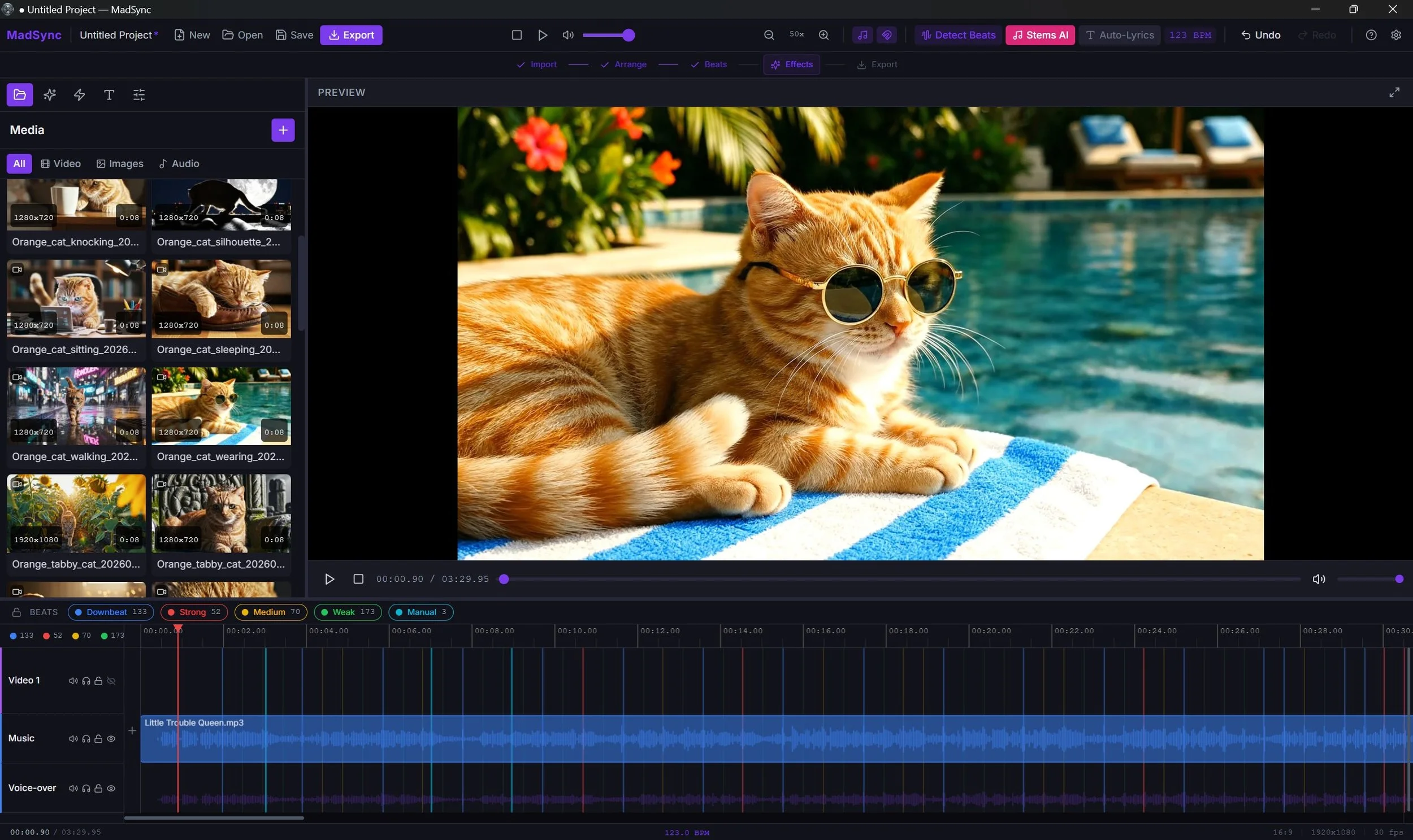
Your track is analyzed locally and beat markers are placed across the timeline: drum hits, downbeats, strong hits, medium hits, and weak hits.
Drum hits ride the isolated drum stem and are best for hard cuts and Beat FX. All markers are color-coded so you can see the structure of the song at a glance.
Add manual beats, remove beats, and use the beat map to line up cuts, effects, lyrics, and visual moments. MadSync gives you the map. You decide what to do with it.
An AMV editor with beat-triggered effects
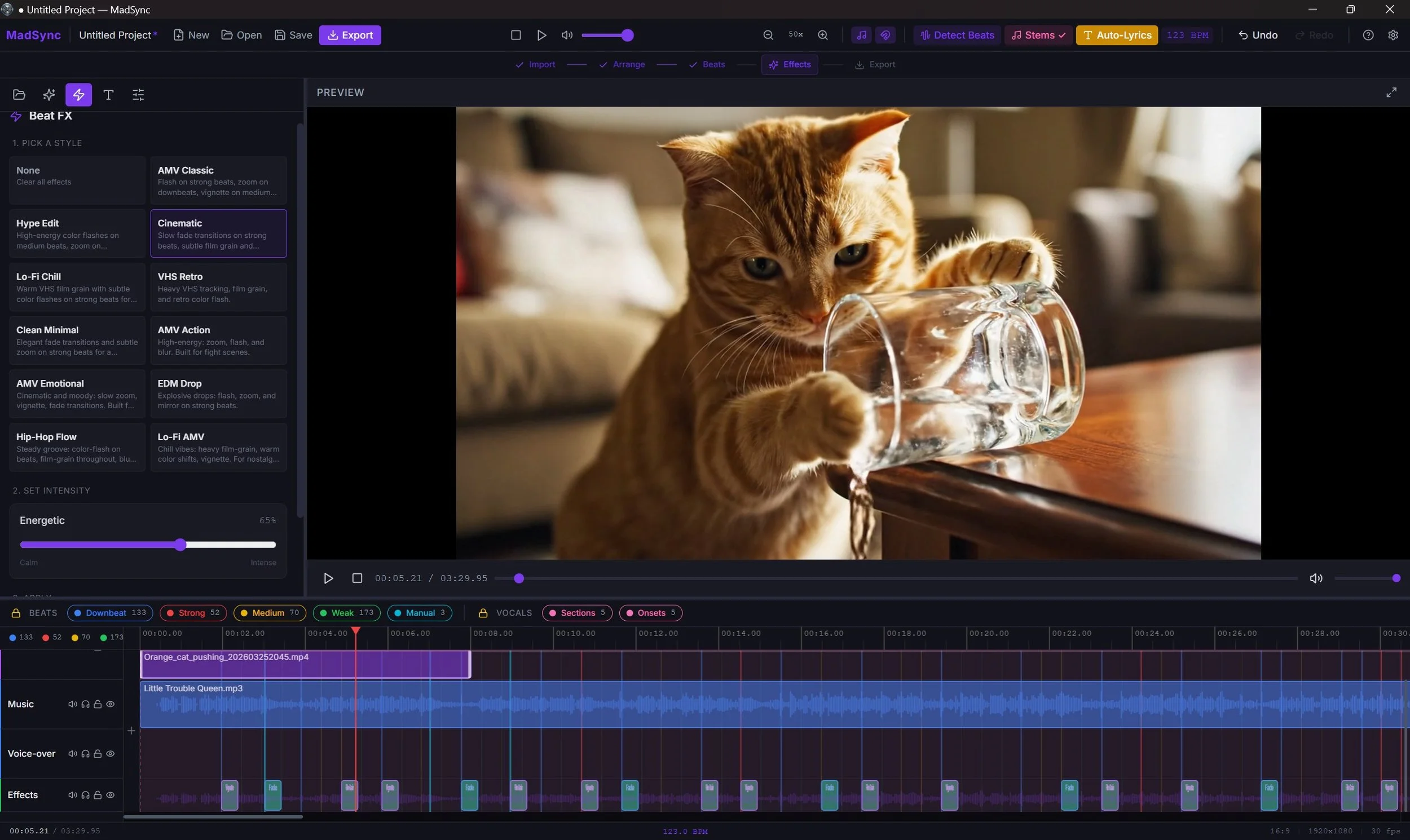
Choose from 11 Beat FX presets: AMV Classic, Cinematic, Hype Edit, Lo-Fi Chill, VHS Retro, EDM Drop, Hip-Hop Flow, AMV Action, AMV Emotional, Clean Minimal, and Lo-Fi AMV.
One intensity slider controls how many beats trigger effects and how hard they hit.
Presets ride drum hits when available, or the beat grid otherwise.
Generated effects become editable timeline clips, so you can adjust or remove anything after the preset runs.
Split supported songs into stems.
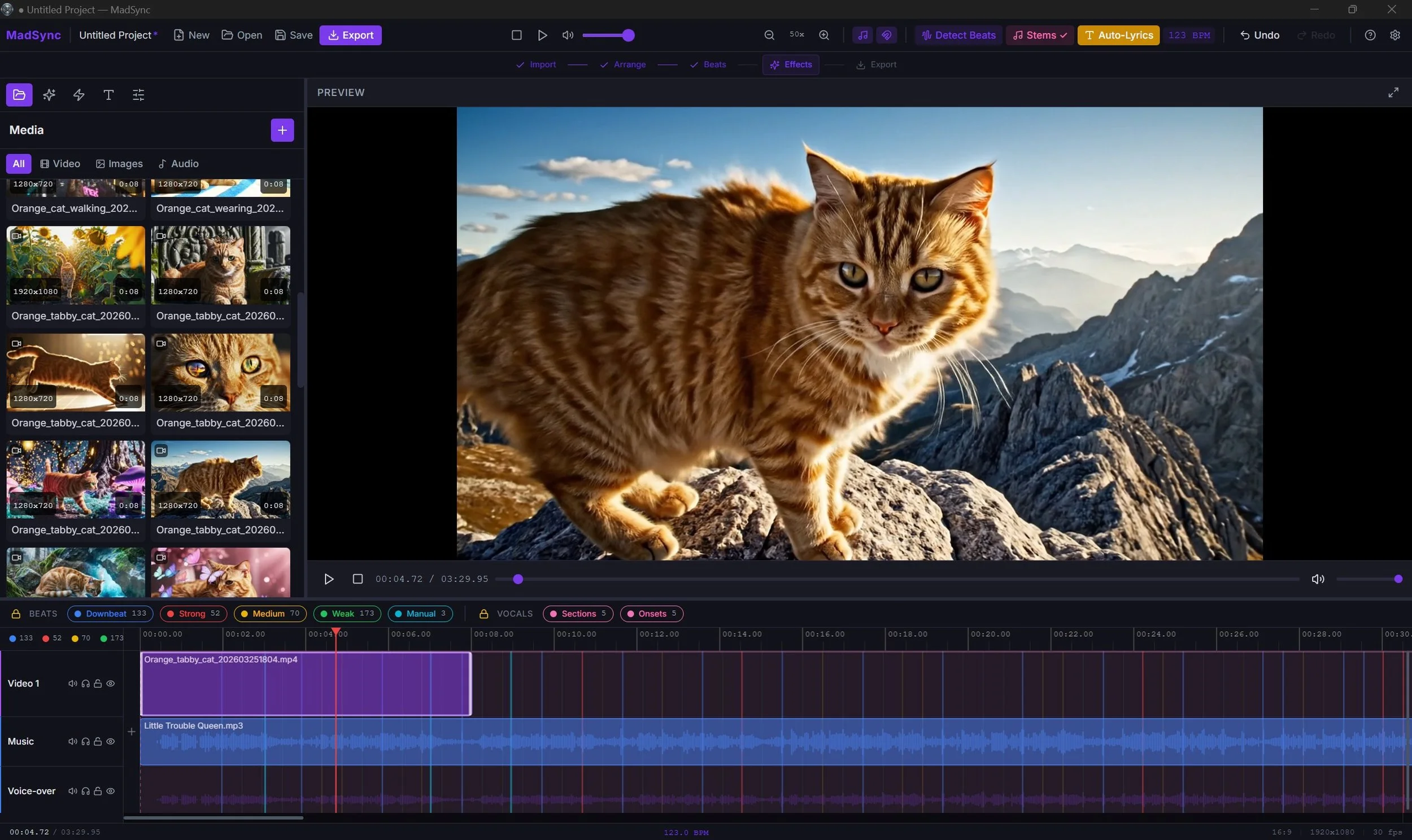
MadSync separates supported songs into vocals, drums, bass, and other stems.
Use the vocal stem to understand where lyrics start and stop.
Use the drum stem to see the rhythm more clearly.
Use the separation to make better editing decisions. Stem processing runs locally on your machine.
Nothing is uploaded.
Text on your timeline.
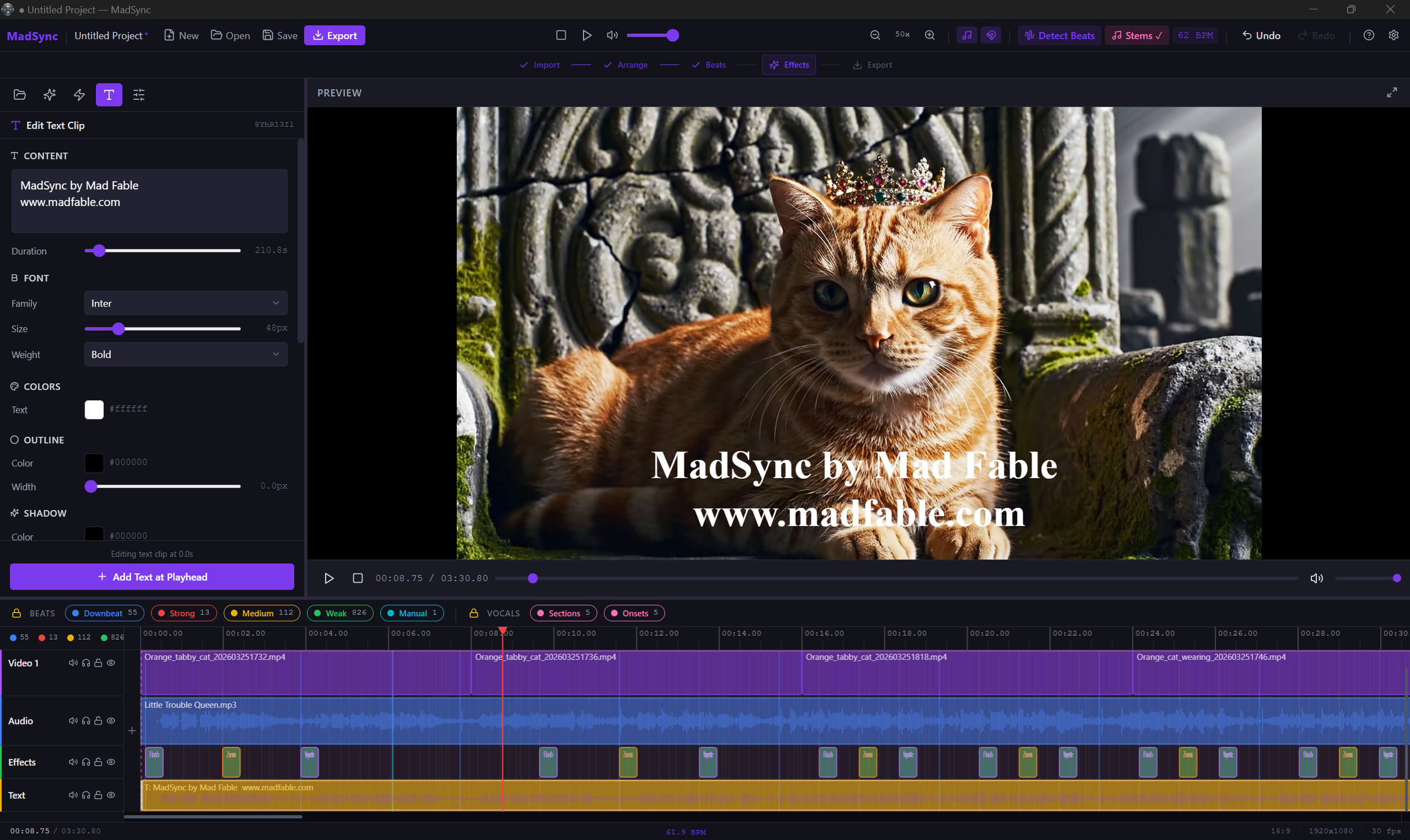
Add text anywhere on the timeline.
Pick the font family, size, and weight, then set the color, an outline, and a soft shadow.
Add a background box with its own color, opacity, and padding when you want the words to stay readable over busy footage.
Place it with top, center, and bottom presets, then fine-tune X and Y. Set the opacity, and long lines wrap to fit the frame on their own.
Animate it in with Fade In, Type On, Bounce, Glitch In, or Beat Pulse. Hold text across the whole video, or drop it in for a single moment.
21 effects. Full control.
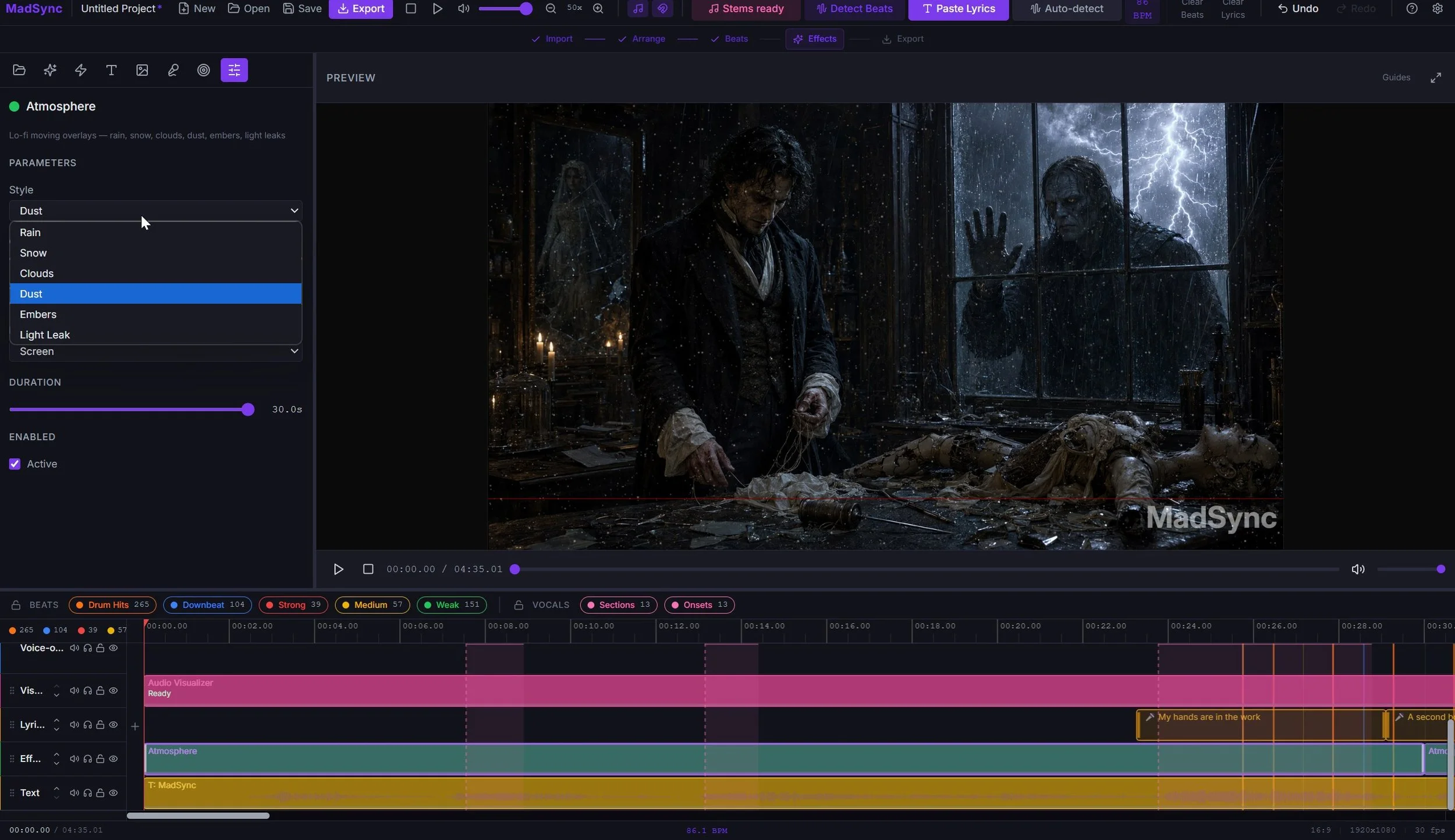
Add animated rain, snow, clouds, dust, embers, or light leaks over a single clip or the whole song.
It is a fast way to give lo-fi, chill, and cinematic edits a finished, moody feel.
Pick a style and set its opacity, drift speed, and blend.
The motion is ambient, so it sets a mood across the whole shot instead of pulsing on the beat, and the look you see in preview is the look you get in the export.
Lo-fi atmosphere and mood overlays
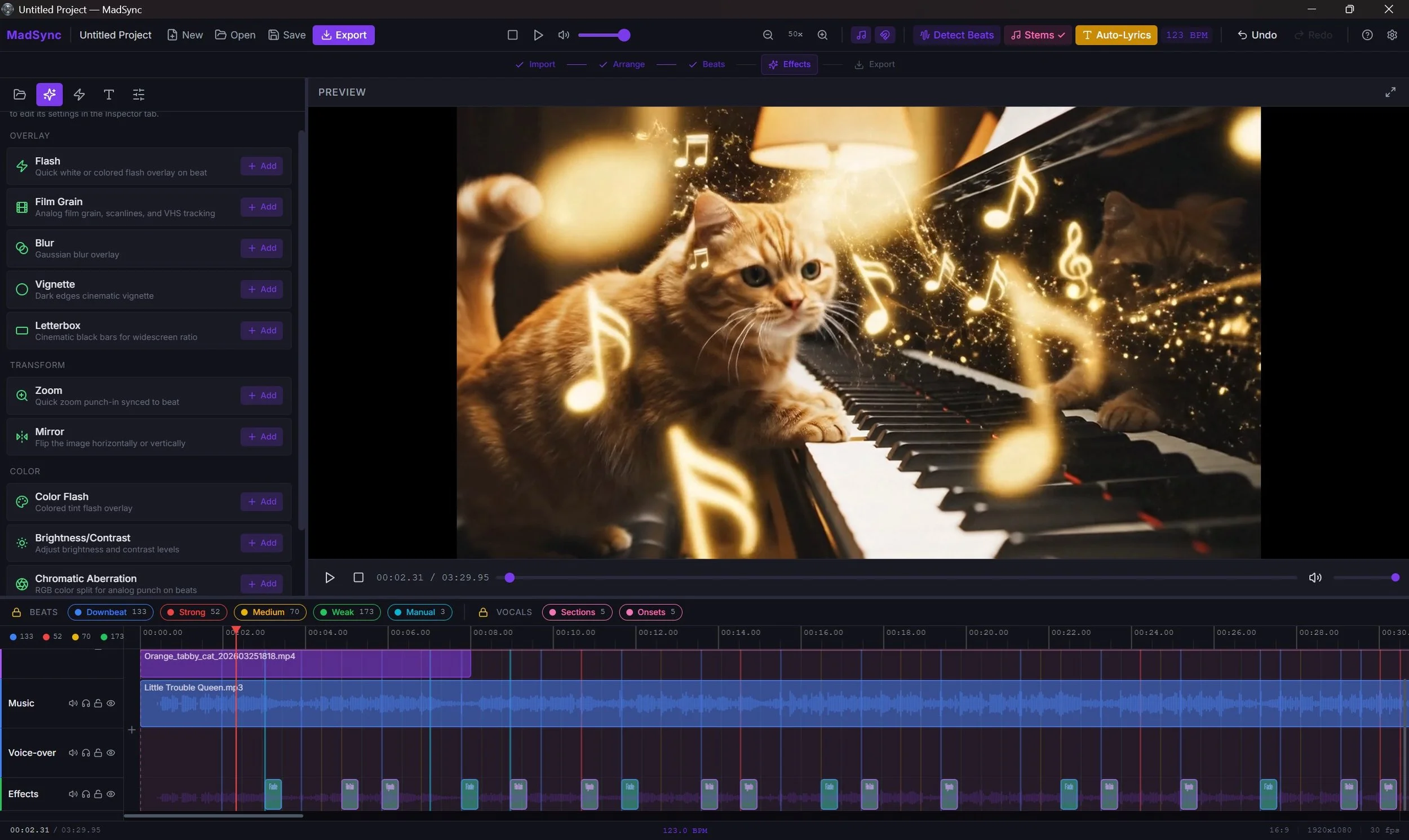
MadSync ships 21 timeline effects in two groups. Look & style: Flash, Color Flash, Fade, Film Grain, Blur, Vignette, Letterbox, Strobe, Chromatic Aberration, Brightness/Contrast, Glow Pulse, and Mirror.
Motion: Beat Zoom, Beat Shake, Punch Zoom, Pull Zoom, Directional Shake, Rotate Bump, Bounce Pop, Whip Blur, and Slow Drift.
Place any effect by hand at any moment on the timeline, or let Beat presets generate editable, export-safe effect clips for you.
A music visualizer that locks to your beat
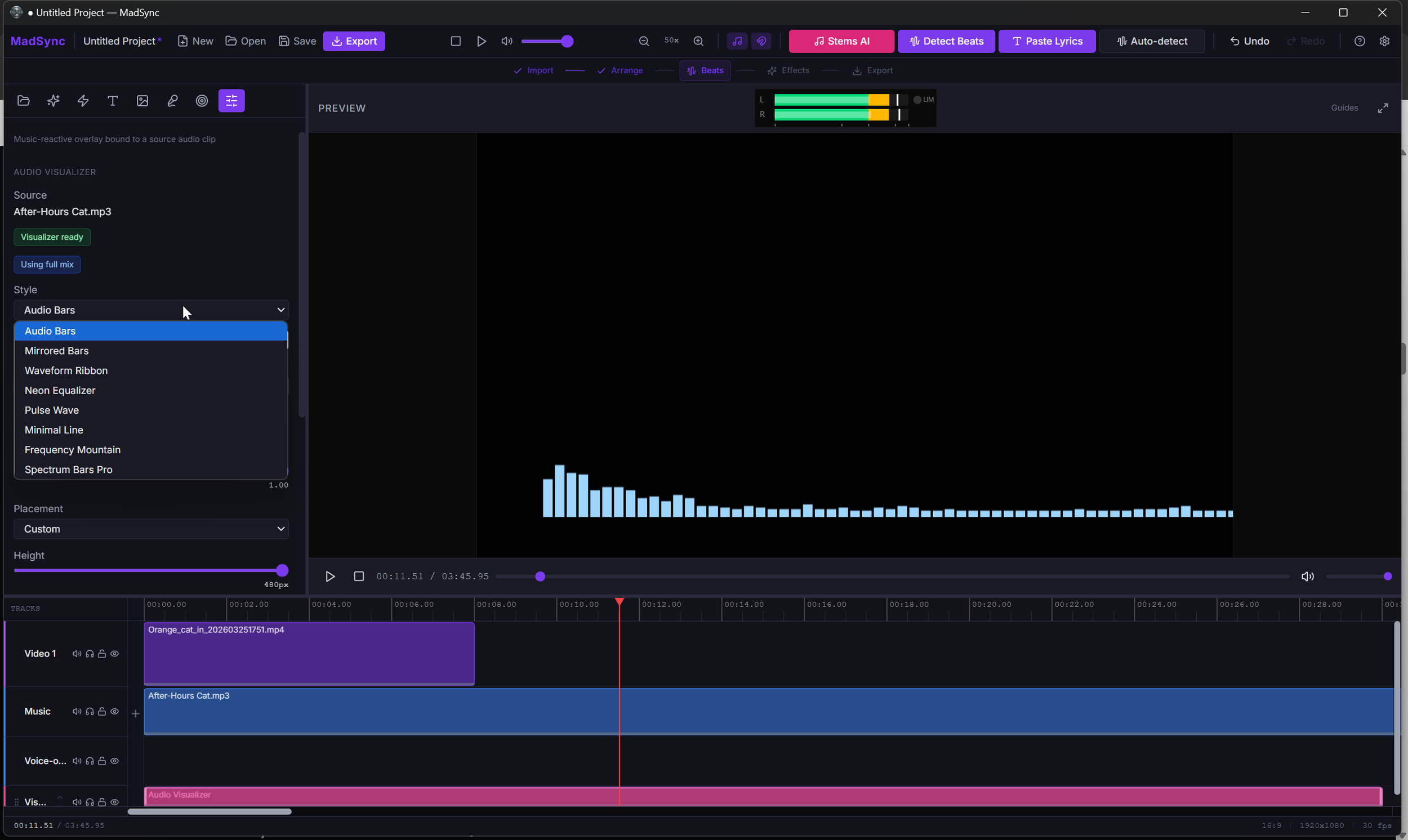
Choose from 8 styles: Audio Bars, Mirrored Bars, Waveform Ribbon, Neon Equalizer, Pulse Wave, Minimal Line, Frequency Mountain, and Spectrum Bars Pro.
Set the color, opacity, height, and placement (top, center, bottom, or custom).
Turn on Beat Boost (subtle or strong) to make the visualizer pulse on every detected beat, locked to your beat grid instead of a generic loudness follower.
A lyric video maker with word-level sync
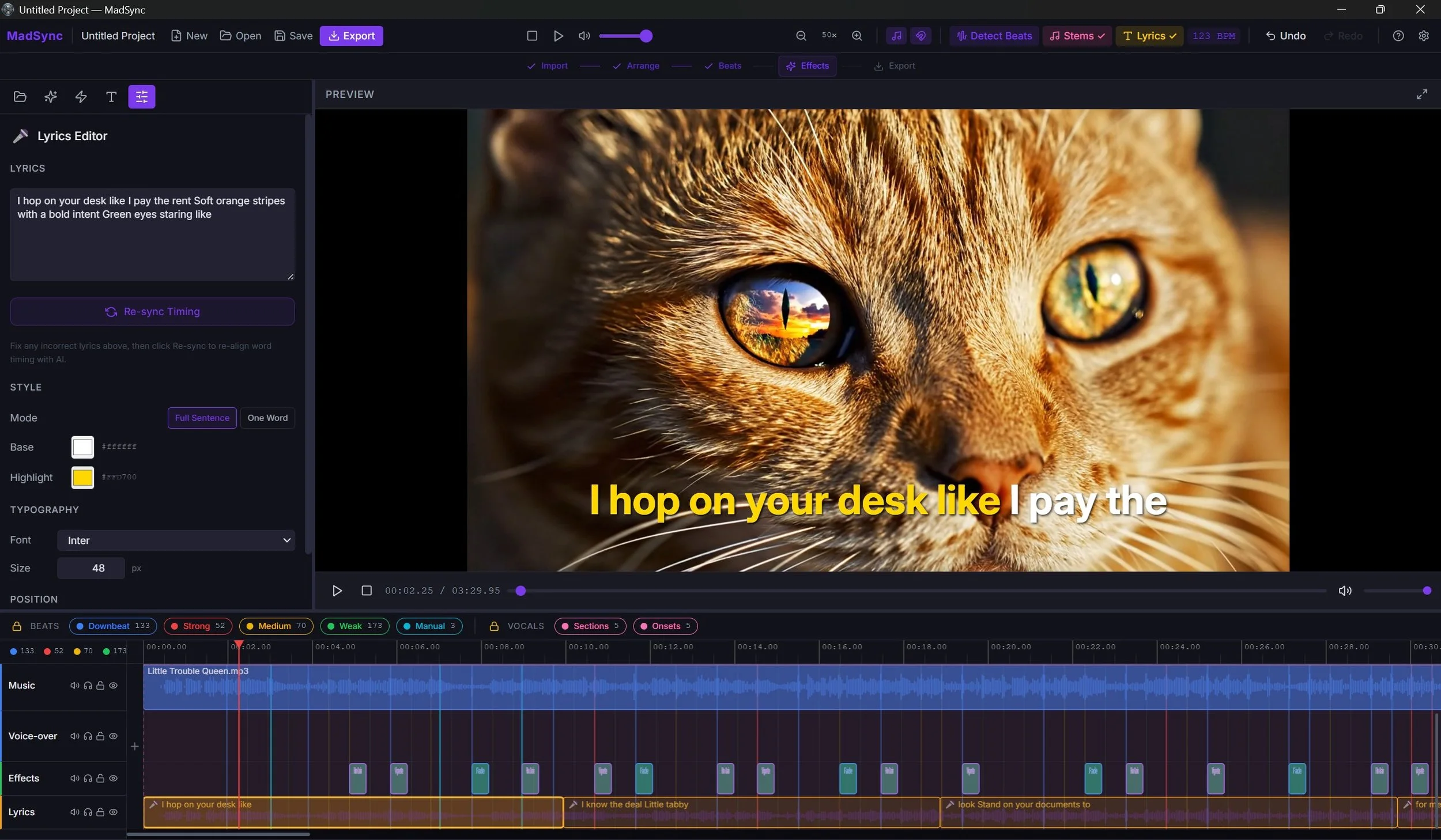
Use Auto Lyrics to transcribe straight from the audio, or use Paste Lyrics for the most accurate word-level alignment.
MadSync places karaoke-style lyric clips right on your timeline.
In Full Sentence mode the whole line stays on screen and each word lights up as it is sung.
One Word mode shows a single word at a time, the TikTok and Reels look.
If a word is wrong, fix the text and hit Re-sync to realign the timing for that section.
Export for the major social platforms.
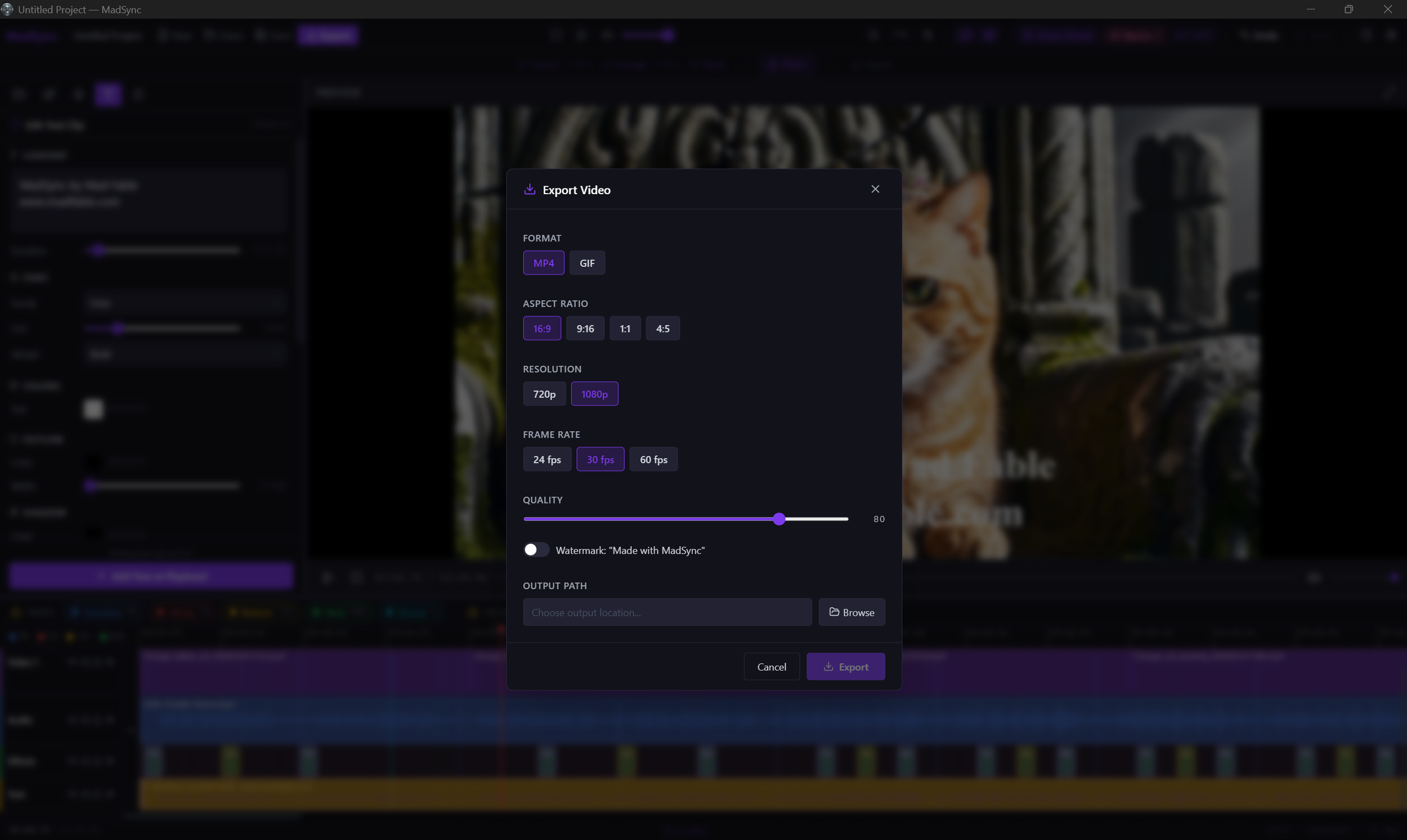
Export for YouTube, TikTok, Instagram, Reels, Shorts, and other common upload destinations.
Render MP4 or WebM at 720p or 1080p, or save a short clip as a GIF. Pick 16:9, 9:16, 1:1, or 4:5 to match where it is going.
Lyrics are baked into the video. Transitions, overlays, effects, and timeline edits all render into the final file.
Fast export uses hardware-accelerated H.264 when your computer supports it, and falls back to software so it still works everywhere.
Made in MadSync
A full music video edited in MadSync, with synced lyrics, effects, and beat-driven visuals. Follow along on YouTube for more.
From song to exported MP4 in one timeline
Start with the song, build around the beat, then export a finished video with lyrics, overlays, effects, and timing intact.

Import your media
Bring in your footage, song, images, GIFs, and lyric text.
Analyze the music
Detect beats, BPM, stems, and vocal moments for a cleaner edit map.

Build the edit
Cut clips, time lyrics, add overlays, style text, and preview changes instantly.

Export the video
Render a local MP4 with audio, lyrics, overlays, effects, and transitions included.
MadSync vs generic video editors and AI generators
MadSync gives you faster beat timing, accurate lyric sync, local control, and a one-time price.
| MadSync | Premiere Pro | CapCut | DaVinci Resolve | |
|---|---|---|---|---|
| Price | $49 once | ~$23/month | Free; Pro ~$10/month | Free; Studio $295 once |
| Beat detection | Built in, ML-based, whole beat grid | Plugin or manual | Basic auto-beat | Plugin or manual |
| Beat-synced effects | 11 one-click presets | Manual keyframes | Basic | Manual keyframes |
| Stem separation | Built in: vocals, drums, bass, other | No | Vocal removal only | Studio only |
| Word-level lyric sync | Auto Lyrics, word by word | Manual | Auto captions, not lyric-timed | Manual |
| Works offline | Yes, no account | Needs Adobe login | Cloud for key features | Yes |
| Subscription | None | Required | Pro features | None |
Competitor prices and features shown are approximate and may change. Check each provider's website for current details.
A local video editor for creators who care about control
Your media stays on your Windows computer. MadSync is built for creators who want a real editing timeline, local processing, and predictable export without handing footage to a cloud generator.
No media uploads
Video, audio, lyrics, images, and exports are handled locally on your machine.
Offline editing after activation
MadSync works locally after one-time online activation. Offline use is not time-limited.
Transparent price
$49 once keeps the offer simple for creators who do not want another monthly editing bill.
Try MadSync free, then $49 to unlock
Download the full app free and edit as much as you want.
Every export gets a small "Made with MadSync" watermark and stops at 60 seconds.
Pay $49 once and both limits are gone. No subscription, no credits.
Removes the watermark and the 60-second cap.
Unlimited full-length exports, every tool included: stems, beats, lyric sync, visualizers, atmosphere, effects, transitions, and MP4/WebM/GIF export.
Secure checkout & activation handled through Lemon Squeezy.
For Windows 10/11, 64-bit. 8GB RAM minimum, 16GB recommended. 6GB storage minimum, 10GB+ recommended for projects, proxies, stems, and visualizer cache.
Zero telemetry. Your media, projects, and editing activity stay on your computer. MadSync reaches one service, Lemon Squeezy, to activate your license and to re-check it about every two weeks when you are online. After activation, it keeps working offline with no time limit.
Built by Madfable. One-time purchase software that respects your privacy.
MadSync is built on FFmpeg/FFprobe (LGPL), Demucs by Meta (MIT), faster-whisper/CTranslate2, librosa (ISC), PyTorch (BSD), Electron (MIT), React (MIT), and other open-source components. Full third-party attributions and licenses are included with the app.
Frequently asked questions about MadSync
-
Yes. You can download the free demo and use the full app, every tool included. The only limits are a small "Made with MadSync" watermark on your exports and a 60-second cap per export. A one-time $49 license removes both, and you enter it right inside the app with no reinstall. Nothing is time-limited, so take as long as you want to decide.
-
Yes. MadSync is a normal Windows desktop app, code-signed by a verified publisher (Michael Raposa, the founder of Madfable), so Windows shows a trusted signature instead of an "Unknown Publisher" warning. It runs entirely on your PC, and nothing you import, edit, or export is ever uploaded. The installer is about 1.6 GB because the AI tools for stems, lyrics, and beat detection are bundled in, so they work offline with no extra downloads.
-
Yes. Drop in a song and MadSync transcribes the lyrics with word-level timestamps. The AI runs locally on your PC, so the song never leaves your machine. Edit any misheard word and re-sync that section without redoing the whole track. Two karaoke modes are included: full-sentence scroll and TikTok-style one-word-at-a-time.
-
Yes. MadSync is a lyric video maker with word-level sync. Use Auto Lyrics to transcribe straight from the song, or Paste Lyrics for the most accurate timing. Then pick a karaoke style: full sentence, where the whole line shows and each word lights up as it is sung, or one word at a time, the TikTok and Reels look. If a word is off, fix the text and hit Re-sync to realign just that section. It all runs locally, so the song never leaves your PC.
-
Yes. MadSync has a built-in music visualizer with 8 styles, including Audio Bars, Neon Equalizer, Waveform Ribbon, and Spectrum Bars Pro. Set the color, opacity, height, and where it sits in the frame. Turn on Beat Boost and it pulses on every detected beat, locked to your beat grid instead of a generic loudness follower. Drop it over one clip or the whole song.
-
Yes. MadSync uses multi-pass AI beat detection to map every beat in the track, then you snap your clips to the beat grid as you edit. The beat tracker is editable, so you can fine-tune anywhere it gets a beat slightly wrong before exporting.
-
No. MadSync is an editor, not a generator. It is built for creators who already have footage and audio and want help with beat detection, stem separation, lyric timing, and beat-synced effects inside a real desktop timeline.
-
Click one button and MadSync transcribes your song with word-level timestamps. Lyrics appear on a dedicated track synced to the vocals. Choose full sentence or one-word-at-a-time display. If a word is misheard, edit the text and click Re-sync. MadSync re-runs just that section with your corrected text and returns precision timing.
-
Import your music into MadSync, click Detect Beats, and MadSync maps every beat on the timeline. Arrange your video clips snapped to those beats, apply a style preset, and export. The beat markers guide your edits so your cuts align with the rhythm.
-
Yes. $49 once, and the full editor is yours to keep, with unlimited local exports.
-
MadSync uses Meta's Demucs to split any song into separate tracks: vocals, drums, bass, and other instruments. This helps you see where vocals start and stop so you can time your edits to specific parts of the music.
-
MadSync was built with AMV creators in mind. Style presets like AMV Classic, AMV Action, and Lo-Fi AMV are designed specifically for anime music video editing. Beat-triggered effects make it easier to time your cuts to the music.
-
Item descriptMP4 (H.264) for YouTube, TikTok, Instagram, and everywhere else. GIF for Discord, Reddit, and social sharing. Multiple aspect ratios: 16:9, 9:16, 1:1, 4:5. Resolutions up to 1080p at 24, 30, or 60fps.ion
-
Yes. MadSync runs on your Windows PC. After a one-time activation, it works offline.
-
Yes. MadSync is a desktop music video editor for Windows. Pay $49 once and the full editor is yours, including local auto-lyrics and beat detection. Your files stay on your machine.
-
Yes. MadSync is a desktop alternative to CapCut for Windows users. Pay $49 once and the full editor is yours, including AI auto-lyrics and beat detection. Files stay on your machine.
Make your next music video hit the beat
Buy MadSync once, keep your media local, and build beat-synced videos with beat timing, lyric sync, and mood built into the timeline.